Debit Note Management
Debit Notes in Hbl's simpleBillBook are used to record returns, damages, or adjustments to vendor purchases. They help maintain accurate vendor accounts and inventory records when goods need to be returned or when price adjustments are required.
Overview of Debit Notes
Debit Notes serve several purposes:
- Purchase Returns: Return defective or incorrect goods to vendors
- Damage Claims: Record damaged items received from vendors
- Price Adjustments: Correct pricing errors from vendors
- Quantity Adjustments: Adjust for short shipments or overcharges
- Warranty Claims: Process warranty returns to vendors
Viewing Debit Notes
To view all debit notes:
- Navigate to Manage Purchase → Debit Note from the main sidebar
- You'll see a table listing all debit notes with their details
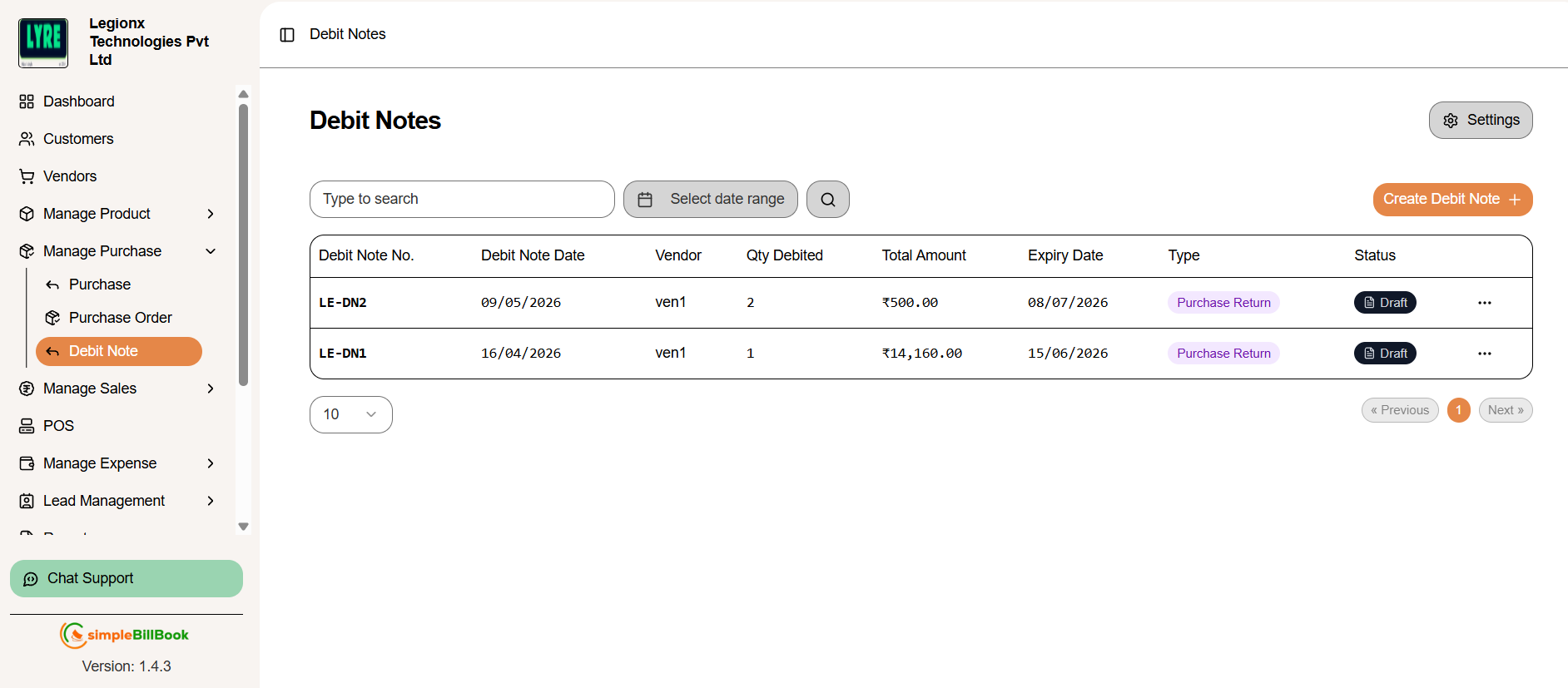 Figure 1: Debit notes list showing all debit notes with status and details
Debit Note Table Columns:
Identification:
- Debit Note No.: Unique identifier (e.g., DN12)
- Debit Note Date: Date when debit note was created
- Vendor: Vendor name
- Type: Reason for debit note (Damage, Return, Adjustment, etc.)
Quantitative Details:
- Qty Debited: Total quantity of items returned/adjusted
- Total Amount: Financial value of the debit note
Administrative Information:
- Expiry Date: Validity period for the debit note
- Status: Current status (Draft, Sent, Approved, Processed)
Navigation and Search:
- Type to search: Search by debit note number, vendor, or type
- Pagination: Navigate through pages (Previous, 1, Next)
- Items per page: Display 10 items per page (configurable)
- Select date range: Filter data using date range.
Creating a New Debit Note
Step 1: Access Debit Note Creation
From the debit notes page, click Create Debit Note + button.
Step 2: Fill Debit Note Details
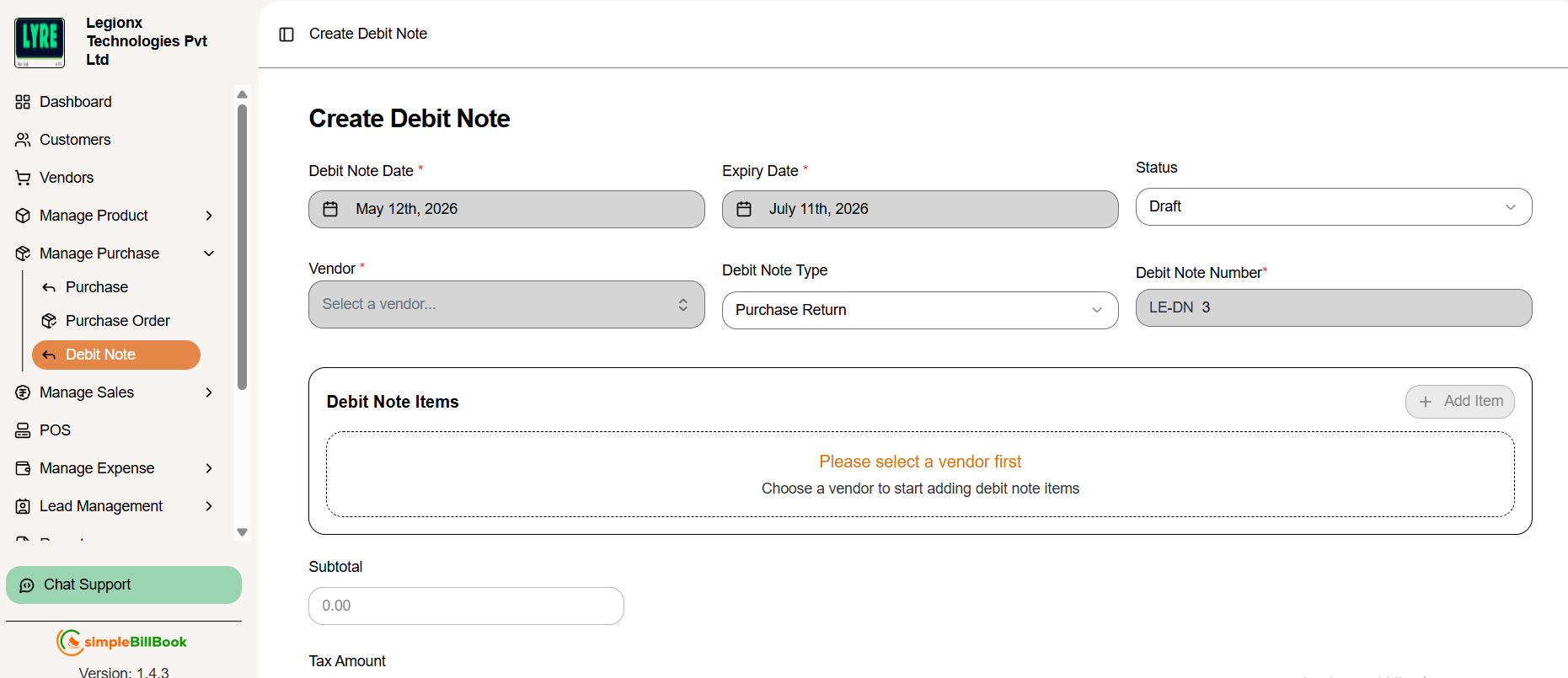 Figure 2: Form for creating new debit notes
Header Information:
- Vendor: Select vendor from dropdown (required)
- Debit Note Date: Auto-filled with current date (editable)
- Expiry Date: Validity period for the debit note
- Debt Note Type: Select type (Purchase Return, Damage, etc.)
- Debit Note No.: Auto-generated based on settings (e.g., DN 13)
- Status: Defaults to "Draft" (can be changed to "Issued","Applied", "Expired" or "Cancelled")
Item Selection:
- After selecting a vendor, you can add items
- Select products from vendor's purchase history
- Enter quantities to debit and reasons
- System shows original purchase details for reference
Notes and Financials:
- Notes: Add detailed explanation for the debit note
- Subtotal: Sum of all item values before tax
- Tax Amount: Calculated tax adjustments
- Total Amount: Final amount to be debited from vendor
Step 3: Save Debit Note
- Create Debit Note: Finalize and create the debit note
- Cancel: Discard the debit note
Debit Note Settings
Accessing Debit Note Settings
From the debit notes page, click Settings to configure defaults.
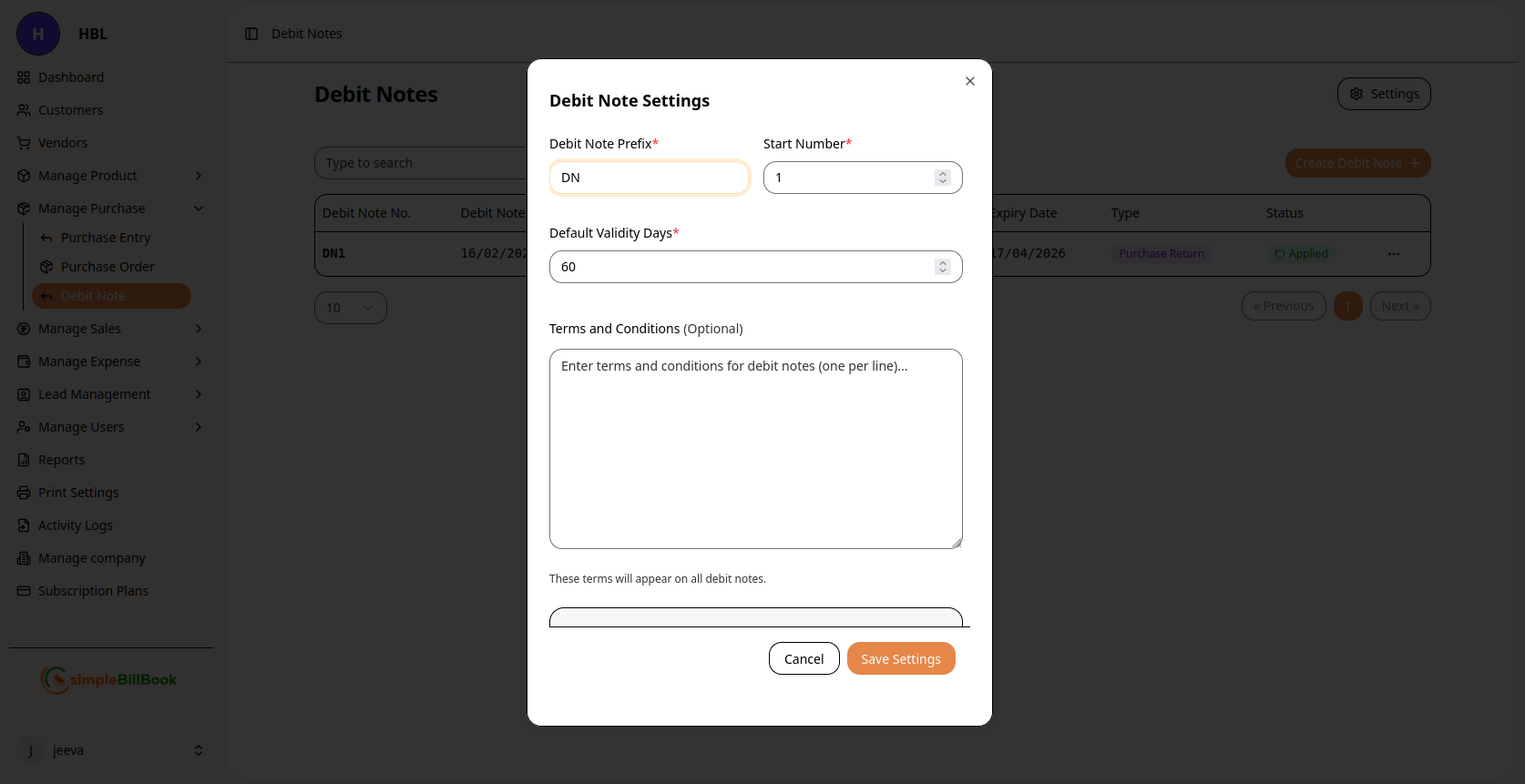 Figure 3: Configuration settings for debit notes
Configurable Settings:
Numbering System:
- Debit Note Prefix*: Custom prefix (default: "DN")
- Start Number: Beginning sequence number
- Default Validity Days*: Number of days debit notes remain valid
Terms and Conditions:
- Default Terms: Enter standard terms (one per line)
- Return Policies: Specify return conditions and timelines
- Approval Requirements: Set approval workflows if needed
Saving Settings:
- Click Save Settings to apply changes
- Use Cancel to discard modifications
- Settings affect all future debit notes
Debit Note Status Workflow
1. Draft Stage (Status: Draft)
- Debit note is created
- Items and amounts can be edited
- Not yet finalized
2. Issued Stage (Status: Issued)
- Debit note is issued to vendor
- Vendor notified about the adjustment
- Awaiting processing
3. Applied Stage (Status: Applied)
- Debit note amount applied successfully
- Vendor account updated
- Purchase adjustment completed
4. Expiry Stage (Status: Expired)
- Debit note validity period ended
- Cannot be applied further
- Requires renewal or closure
5. Cancellation Stage (Status: Cancelled)
- Debit note cancelled manually
- Invalid or rejected entry
- No financial adjustment processed
Types of Debit Notes
1. Purchase Return Debit Notes
- Purpose: Return defective, incorrect, or excess goods
- Impact: Reduces inventory, creates vendor credit
- Timing: Usually within return period specified in purchase terms
2. Damage Claim Debit Notes
- Purpose: Claim for damaged goods received
- Impact: Reduces payable to vendor
- Documentation: Photos, inspection reports often required
3. Price Adjustment Debit Notes
- Purpose: Correct pricing errors from vendor invoices
- Impact: Adjusts purchase cost
- Basis: Based on purchase agreements or quoted prices
4. Quantity Adjustment Debit Notes
- Purpose: Adjust for short shipments or measurement errors
- Impact: Reduces payable for missing quantities
- Verification: Based on receiving reports
5. Warranty Return Debit Notes
- Purpose: Return items under warranty
- Impact: Vendor provides replacement or credit
- Conditions: Must meet warranty terms
Best Practices for Debit Note Management
Creating Effective Debit Notes:
- Clear Documentation: Include photos, inspection reports for damages
- Specific Reasons: Use precise descriptions for return reasons
- Reference Original Purchase: Link to original purchase entry
- Timely Creation: Create debit notes soon after issue discovery
- Accurate Quantities: Verify quantities before creating debit note
Vendor Communication:
- Professional Tone: Maintain professional communication
- Evidence Sharing: Provide supporting evidence to vendors
- Follow-up System: Track vendor responses and acknowledgments
- Negotiation Record: Document any negotiations or settlements
Internal Processes:
- Approval Workflow: Implement approval for significant debit notes
- Document Retention: Keep all supporting documents
- Regular Review: Review pending debit notes regularly
- Performance Tracking: Monitor debit note resolution times
Integration with Other Modules
Vendor Management:
- Account Adjustments: Debit notes reduce vendor payable balances
- Performance Tracking: Tracks vendor quality issues
- Relationship Management: Helps in vendor evaluation
Inventory Management:
- Stock Adjustments: Returned items reduce inventory levels
- Quality Control: Tracks defective items by vendor
- Cost Adjustments: Updates average cost when prices adjusted
Purchase Management:
- Purchase History: Links debit notes to original purchases
- Account Reconciliation: Helps reconcile vendor statements
- Future Purchasing: Informs future vendor selection
Financial Accounting:
- Account Payable: Reduces accounts payable
- Expense Adjustments: Corrects expense recording
- Tax Adjustments: Handles tax reversals on returns
Common Scenarios and Solutions
Scenario 1: Partial Shipment of Defective Goods
Solution:
- Create debit note for defective items only
- Keep good items in inventory
- Request replacement for defective items
- Or take credit for defective portion
Scenario 2: Price Discrepancy Discovered Late
Solution:
- Create price adjustment debit note
- Reference original purchase and agreed prices
- Negotiate with vendor for retroactive adjustment
- Adjust inventory cost if already sold
Scenario 3: Vendor Disputes Debit Note
Solution:
- Provide all supporting documentation
- Escalate to higher authority if needed
- Consider partial settlement if appropriate
- Document resolution for future reference
Scenario 4: Time-Sensitive Returns
Solution:
- Create debit note immediately upon discovery
- Mark with high priority if time-sensitive
- Follow up with vendor promptly
- Consider alternative resolutions if vendor unresponsive
Reports and Analytics
Available Debit Note Reports:
- Open Debit Notes: All pending debit notes by vendor
- Debit Note Aging: How long debit notes have been pending
- Vendor Return Analysis: Returns by vendor and reason
- Value of Returns: Financial impact of returns
- Resolution Time: Average time to resolve debit notes
Key Metrics to Monitor:
- Debit Note Rate: Percentage of purchases resulting in debit notes
- Resolution Time: Average days to resolve debit notes
- Vendor Performance: Return rates by vendor
- Financial Impact: Total value of debit notes by period